Words, without the clutter.
Read and edit beautifully formatted notes. Switch to Markdown whenever you want to get closer to the source.
 NotesDive
A quieter kind of notes app
A calm home for your Markdown notes.
Write, read, and bring your next steps into view.
All in a folder that’s yours.
On your device. Without an account.
A space that makes sense
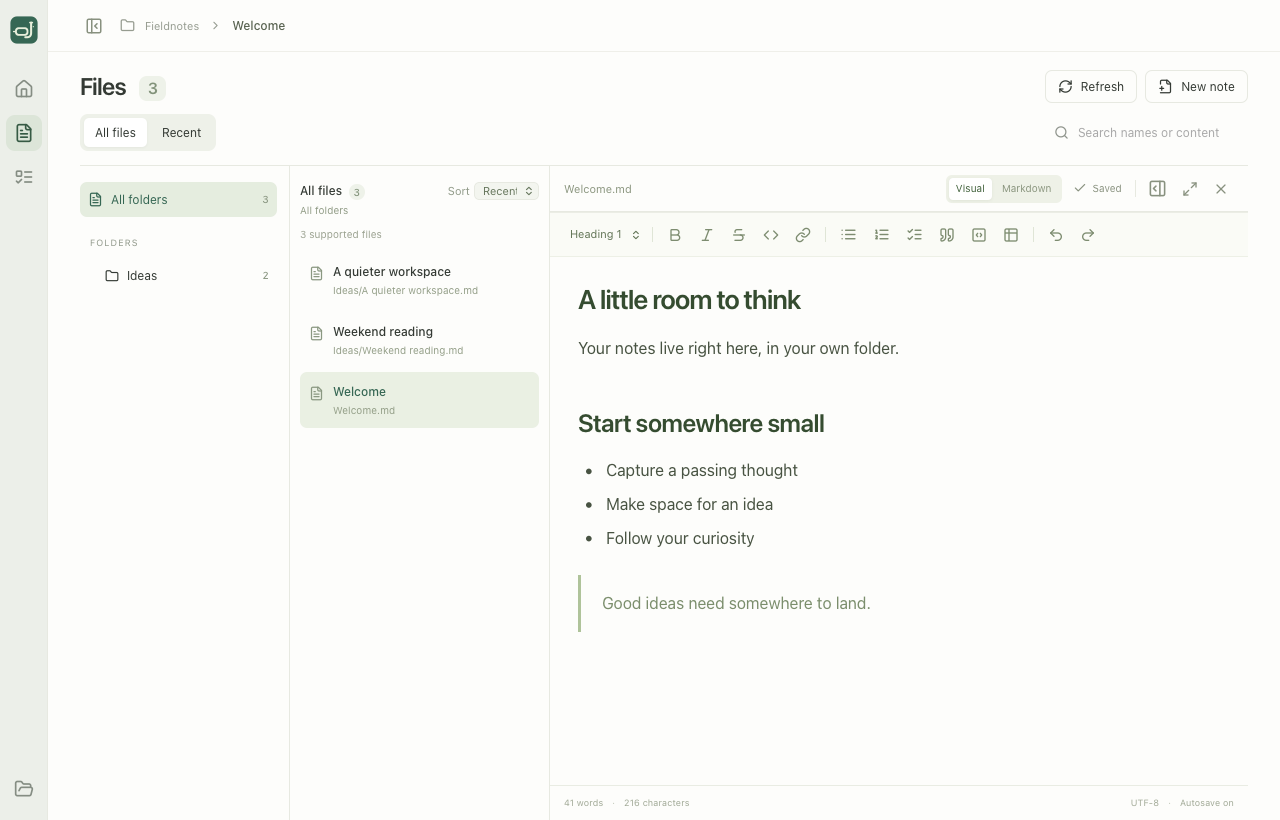
Read and edit beautifully formatted notes. Switch to Markdown whenever you want to get closer to the source.
Your folders, with a little breathing room. Search names and contents, or pick up a recently changed note.
Todos from across your notes, gathered by document. Check one off and the original Markdown file updates, too.
Plain files. A lasting home.
Open a folder and you’re home. NotesDive reads and writes the Markdown files already on your device. No import ceremony. No new format to commit to.
Explore NotesDiveA few good questions
Yes. Choose a local folder and NotesDive finds its .md and .markdown files, including notes in subfolders. Your folder structure stays intact.
In the folder you choose, on your device. NotesDive writes directly to your Markdown files and has no cloud service or account. Back up that folder as you would any important files.
NotesDive gathers Markdown checkboxes from your notes and groups them by document. It scans when you open the folder and updates changed files in memory. No database or separate task storage.
NotesDive is an early preview. A free macOS Apple Silicon download is available below. The binary is MIT licensed; the source code is private. This macOS preview is unsigned; Windows and Linux downloads are not available yet.
Start with a folder. See where it goes.
NotesDive is taking shape. Try the early preview
and help make a quieter place to work.